The ADHD Vault · New
A whole life planner
that folds itself away
on the bad days.
Tasks, chores, money, meals, movement — eighteen tabs that fill each other in, so you never type the same thing twice. One switch folds the heaviest half of the dashboard away when today isn't a heavy day, and puts it back unchanged.
Seventy seconds of the planner actually being used. No talking — there is no sound.
5 free days, counted only when you use it · Just your email, no card · Then $27 once
What you get for $27
Everything, once, and then it's yours

- Eighteen tabs — one screen each, nothing buried
- Low Energy Mode that folds the heaviest panels away
- A recurrence engine — say a chore once, it schedules itself
- The Invisible Load — who in the house is actually carrying what
- Calendar and week view that draw themselves from everything else
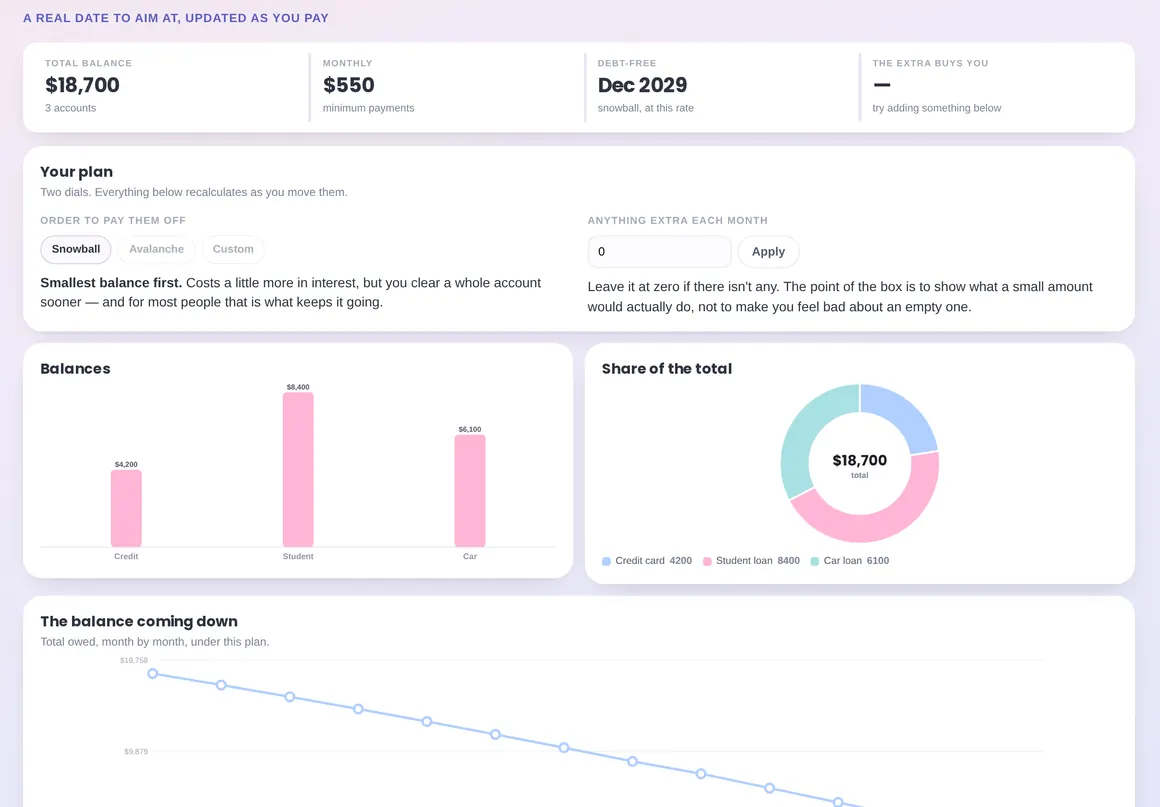
- Budget by pay period, savings pots, debt payoff with a real date
- Meal planner that builds the shopping list, grouped by aisle
- Movement, drinks and weight — logged gently, no streaks
- Six currencies, metric or imperial — switch, and it converts what you've logged
- A clear-colours switch — colourblind-safe marks, every chart labelled in words
- Backup and restore as a plain file you own — and it refuses a file that isn't one
- Lifetime access — one payment, updates included
Why this one is different
You have bought a planner before.
Probably more than one. There is nothing wrong with you — the planners were built for a person whose Tuesday looks like their Monday.
- The setup becomes its own project, and you never finish it.
- Your capacity drops. The plan does not.
- One missed day turns into a screen full of red.
- You come back in March and it's a museum of who you were in January.
This planner breaks the chain at step three. It asks how much you've got, and changes what it shows you.
How it works
Four moves. No system to learn first.
You can use it properly on day one with three tasks in it. Nothing is required before it starts being useful.
Say how much you've got
Five buttons at the top of the dashboard, from Running on empty to Full tank. Not how much you should have. How much you have.
The dashboard re-sorts itself
On the low answers, Low Energy Mode comes on by itself. The money and wellness panels fold away, each with a line saying so, and the bigger tasks step back. Nothing is deleted — it is put down.
Say a repeating thing once
“Bedsheets, every two weeks, mine.” The schedule builds itself from that, for as long as you want it to.
Everything fills in everything else
Tasks, bills, birthdays and goals draw themselves onto the calendar. Ingredients become the shopping list. You never type the same thing twice.
The switch
Low Energy Mode
The same planner, with its heaviest screen made lighter. Nothing is deleted, nothing resets, and everything comes back exactly as it was when you say you've got more.

- The money and wellness panels fold away, each with a line saying they're folded — not hidden from you
- Bigger tasks step back; the small ones stay
- The recurring schedule shortens to the next week
- Switch it on by hand any time — some days you know before the app does
The tab no other planner has
The Invisible Load
Most planners let you assign a task to someone. This one adds it up. A chore that comes round every week isn't one line on a list — it's fifty-two occasions of somebody having to remember it, and that is what gets counted here.

It needs a second name in Setup before it has anything to compare — the one part of the planner that isn't useful on its own.
- Repeating jobs weighted by how often they actually happen, per year
- Which areas of life have exactly one name against them
- A share figure you can put on the table, instead of a feeling — as true as the names you've put against things
- Tap any repeating job to hand it to somebody else
- It counts things, not minutes — and the page says so, on the page
- A description of what you wrote down, not an accusation
The part that saves the most
The chores stop needing re-typing
The usual reason a planner dies is re-entry: the same twelve chores typed in again every week until you stop. Here a repeating thing is described once — how often, who carries it, when to stop — and the schedule builds itself.

- Eight frequencies, from weekly to yearly
- An end date, or forever
- “Just this one…” — move a single occurrence and the series carries on untouched
- One button puts a moved occurrence back in step
One entry, everywhere
The calendar draws itself
Tasks, repeating jobs, bills, goal deadlines and birthdays all arrive on the monthly calendar and the week view without being entered twice. When it gets loud, switch a layer off.

- Five layers you can hide independently
- Week starts Monday or Sunday, your choice
- Time blocking in half-hour slots, any time from 00:00 to 23:30
- On a phone the month becomes a readable agenda, not a grid of dots
Food
The meal plan writes the shopping list
Put the ingredients under the day you'll cook them. They arrive on the grocery tab grouped by aisle, so you walk the shop once. The same thing needed on three days is one line, with the amounts added together — buying it twice is the failure mode.

- Seven days × four meals, several lines each
- Quantities and units, or leave them blank
- Add your own items alongside the ones from the plan
- Tick something off and every day that needed it is ticked
Money · the budget
Money that arrives on payday, not on the 1st
Most budgets assume the month is the unit. Yours probably isn't — it's from one paycheck to the next, and whatever was left over came with you. So the budget runs on any stretch you name, with the balance you carried in already counted.

- Any period — a month, a fortnight, one payday to the next
- What you carried in is part of the sum, not a footnote
- Income, savings, bills, expenses and debt — planned against actual
- Left to budget and left to spend are two different numbers, and it shows both
- Bills carry their own dates, and tick off as you pay them
- Going over is information: it tells you the plan was wrong, not that you were
Money · savings and debt
A date you can actually plan around
Budget by pay period rather than by calendar month, because that's how money actually arrives. Savings pots work out what you'd need to put aside each month to arrive by the date you named. Debts get a real payoff date from a real simulation.
- Income, savings, bills, expenses and debt — planned vs actual
- Left to budget and left to spend are two different numbers
- Snowball, avalanche or your own order, with the interest each one costs
- No 360-row amortisation table. The date is useful; the table is anxiety
Wellness, without the scolding
Movement and drinks, logged gently
A rest day is a decision, so it gets a button — not a hole in the week. Every drink counts, and the ones that don't hydrate are counted honestly rather than quietly ignored.

- A session can be one line: “Walk, 22 minutes” is a complete entry
- Exercises with weight, sets and reps if you want them — empty if you don't
- Eight drink types, and how you felt alongside them
- Weight as a line, not a verdict. No goal weight. BMI is off unless you turn it on
The full planner
Eighteen tabs, one screen each
Grouped the way the sidebar groups them. You are never more than one click from any of it, and you never have to use all of it.
- How it works — the whole thing in one screen
- Dashboard — everything, on one screen
- Monthly calendar — with layers
- Week + blocking — half-hour slots
- Who carries it — the invisible load
- Tasks — five priorities, waiting not overdue
- Recurring — the engine
- Goals — with a reward and a why
- Habits — a grid, no streaks
- Budget — by pay period
- Savings — pots with a target date
- Debt — snowball or avalanche
- Meal planner — seven days
- Grocery list — by aisle
- Fitness — sessions and rest days
- Weight — a line, not a verdict
- Hydration — every drink, not just water
- Setup — areas, people, birthdays, preferences, backup
The wording
Nothing in here tells you off
Not as a theme. As a rule applied to every string in the product.
| Every other planner | This one |
|---|---|
| Overdue | Waiting 12d — a fact about the task, not a verdict on you |
| Streak broken · 0 days | There are no streaks anywhere in the product |
| Are you sure you want to delete? | It's gone, with an undo at the bottom for a few seconds |
| Complete setup to continue | It works empty. Setup is a tab, not a gate |
| You missed 4 days this week | A lighter dot on the grid, and nothing else |
| Assigned to | Who carries it |
Illustrative example
What one screen can settle
An example, not a customer story
A household argues about chores roughly once a month, and it never resolves, because both people are arguing from a feeling. One of them writes the repeating jobs into the planner over a couple of weeks — bins, bedsheets, the school forms, the vet, the birthday presents, restocking things nobody notices until they run out — and puts a name against each.
The Invisible Load tab then says something specific: 83% of everything with a name on it, and three of the five areas of life have exactly one name against them. Not because anyone is a villain. Because the jobs that repeat weekly are invisible in a way the jobs that happen once are not.
That is a different conversation from “you never help.” It's a page you can both look at, and the fix is visible on the same screen: tap a repeating job, hand it over, watch the number move.
Figures above come from the planner's own example data, to show what the screen looks like — not from a real household.
Honestly
Who this is for, and who it isn't
A good fit
- Late-diagnosed women who are tired of planner shame
- Anyone whose capacity swings from day to day
- People who run a household and can feel it, but can't show it
- People who want tasks, money, food and health in one place
- Anyone who has abandoned four planners and blamed themselves
- Anyone avoiding another monthly subscription
Not the right fit
- You need it to sync automatically between phone and laptop — it does not. It saves in the browser you're using, and you move it with a backup file
- You want shared team project management
- You want it to write into Google Calendar or your bank
- You want an app-store app — this runs in a browser
- You're looking for medical treatment or a diagnosis
Simple pricing
One payment. Yours for good.
No subscription, no premium tier, no login to forget. You buy it once and it keeps working, including the updates.
Everything included
All-in-One ADHD Planner
$27one-time · lifetime access · all eighteen tabs
- The full planner, lifetime access
- Low Energy Mode
- The recurrence engine
- The Invisible Load tab
- Calendar, week view and time blocking
- Budget, savings and debt payoff
- Meal planner and grocery list
- Fitness, hydration and weight
- Backup and restore anytime
- Future updates included
14-day money-back guarantee. If it doesn't help, email us for a full refund — no questions asked.
Instant access · Payments are securely processed by Stripe · We never see or store your card details · No account needed
Good to know
Questions worth asking
Where is my data stored? Is it private?
Everything stays in the browser on your own device. There is no account, no analytics, and not a single request to anywhere — the planner doesn't even fetch its own typeface — so nobody, including us, can see what's in your planner. It loads once and then talks to nothing.
The trade-off is real and worth saying plainly: clearing your browser data can remove it, and it does not sync between devices by itself. So the planner has a Back up button that saves a file and a Restore that reads one back. Use it when you change device, and once in a while anyway.
Does it sync between my phone and my laptop?
No — not automatically. That's the honest answer, and it's the main reason someone might want a different tool. You can move it yourself with the backup file, and it works fine on a phone. But if automatic sync is the thing you need, this isn't it.
Is this a subscription?
No. $27 once. There is no recurring charge, no premium tier and no login that can expire.
Do I need an account?
No. You get a private link, you open it in your browser, and it works. Nothing to sign up for and nothing to remember a password for.
Do I have to set it all up before it works?
No, and that's deliberate. It works empty. Open it, add three tasks, and that's a real day's use. The five areas, the people, the birthdays and the preferences are all optional and all changeable later. There is no wizard and no 600-line instruction sheet.
What if I stop using it for two months?
Then you open it in two months and everything is exactly where you left it. No streak breaks, nothing turns red, nothing is deleted. Tasks with a date in the past are labelled “waiting”, with the number of days — which is a fact about the task, not a comment about you. The habit grid starts a fresh page for the new month, and keeps every month before it on the same tab.
Will it work on my phone?
Yes. It's built to be used on a phone, not just to survive on one — the month becomes a readable agenda, the tabs become a swipeable row, and the charts resize instead of overflowing.
Is it a spreadsheet?
No. It's a real browser app in a single file. Nothing to install, no Google account, no formulas to break by typing in the wrong cell, and no colour-coded warning about which cells you're allowed to touch.
Does it track my weight or tell me what to eat?
There's a weight tab if you want one, and it's deliberately quiet: a line over time, no goal weight, nothing red, and no language about being over or under anything. BMI is off unless you switch it on in Setup, and the planner explains why that number is a weak one before it shows it to you. The meal planner plans meals — it doesn't count anything.
What's the refund policy?
Fourteen days. If it doesn't help, email hello@adhdpearls.com and you'll get a full refund — no questions asked.
A planner you use two tabs of is still a planner you're using.
You don't have to fill all eighteen. Open it, say how much you've got, and let today be enough.
One payment · 14-day refund · Nothing stored on a server
The All-in-One ADHD Planner is a personal organisation tool. It does not provide medical advice, diagnosis or treatment, and it does not replace a qualified healthcare professional. The wellness tabs — movement, drinks and weight — are for your own record keeping only; the optional BMI figure is a rough population statistic, not a health assessment. Always speak to your doctor with any question about a medical condition or medication.